The numbers in your report, and what each one is a share of
Peach measures AI answers. It does not measure website traffic. Every number in a report is a count of sampled answers, and the report says which answers it counted.
- Counts
- Sampled answers from ChatGPT and Gemini. Not visits, clicks or impressions.
- Denominator
- Answers that came back. An engine that returned nothing is left out.
- Old reports
- Re-scored with the current matching rules each time you open one.
What you get
Rate per engine
Live. Where: Report, Overview.
The share of sampled answers that named you, for ChatGPT, for Gemini and overall, with the count of answers behind each figure.
Trend across checks
Live. Where: Report, Overview.
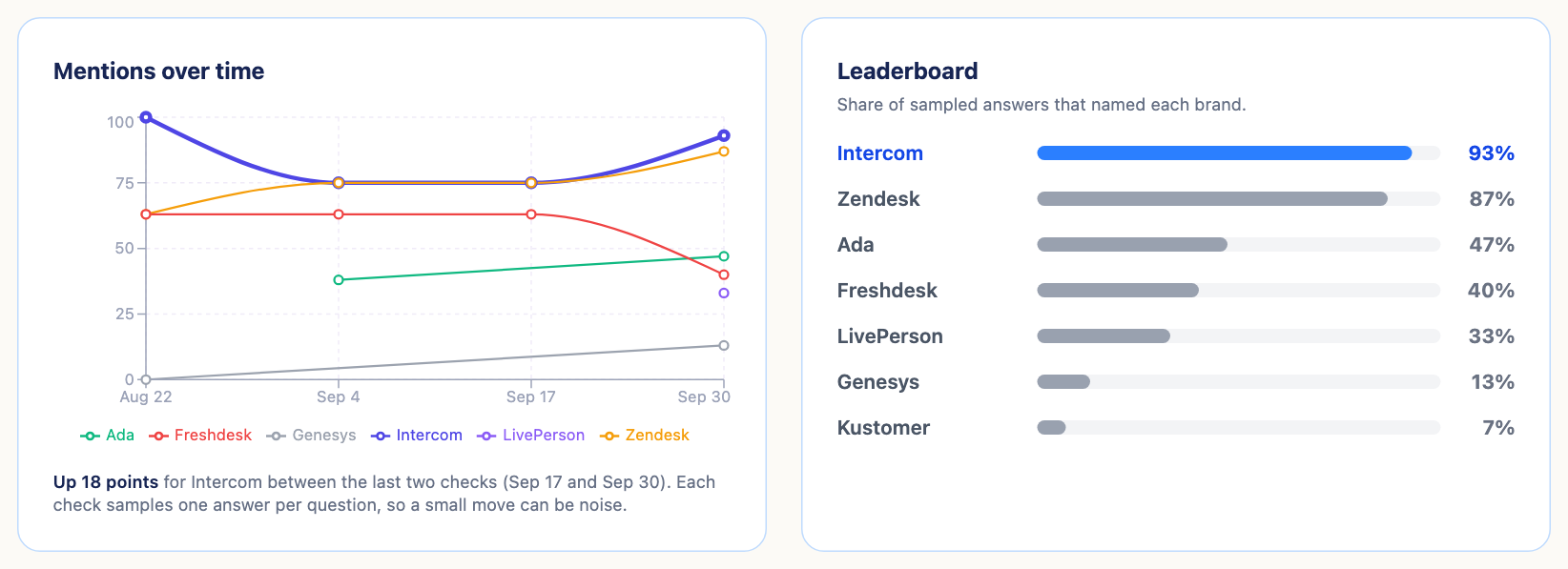
Every saved check of the same website in the same market is a point on one line per brand, and the card states the move between the last two checks. A check measured in another market asked different questions, so it is left off the line and counted beneath it.
Leaderboard
Live. Where: Report, Overview.
You and up to seven competitors, ordered by the share of sampled answers that named each.
Domains named in answers
Live. Where: Report, Citations.
Counts the domain names that appear in answer text, by engine and by question, and marks each as yours, a competitor's or a third party's. These are names written in an answer. They are not source links: the engines are asked without web search, so there are no sources to list. Eight endings are recognised: .com, .io, .ai, .co, .org, .net, .app and .dev.
Fan-Out coverage
Live. Where: Report, Query Fan-Out.
For each estimated sub-query: covered when every engine that answered named you, partial when some did, gap when none did.
Content summary
Paid plans. Where: Content Engine, Summary.
For one website: open gaps, work that has stalled, counts of topics, outlines and articles, how many need review, and a table of everything in progress.
Export
Live. Where: Report header.
Download a report as CSV: every question, both answers, whether you were named, and which competitors were. Print it, or email it to yourself or a colleague.
How it works
- A check is saved. Every check you run while signed in is stored on your account.
- Opening it re-scores it. Old and new reports are counted with the same rules, so a trend compares like with like.
- Run another check. The trend gains a point for the same website and market.
- Take the numbers out. CSV, print or email.
What this doesn't do
- It does not measure traffic: no visits, clicks or conversions, from AI engines or anywhere else.
- It does not connect to Google Search Console or Google Analytics.
- It does not track social posts.
- It does not tie a visit to the answer that sent it.
- It does not refresh daily. The trend has one point for each check you ran.
- It does not make a PDF, and it has no API.
- It does not make a public link to a report. To show someone a report, send the CSV or the email.
Coming soon
- Scheduled re-checks (coming soon): Not built. Until then the trend moves only when you run a check.
- Alerts when a rate moves (coming soon): Not built.
Questions
Does Peach show how much traffic AI sends me?
No. Peach reads AI answers and counts who they name. It has no connection to your site's analytics. Use your analytics tool for visits.
What is a rate a share of?
Of the sampled answers that came back for that engine. With eight questions and both engines answering every one, that is sixteen answers.
Why is one of my checks missing from the trend?
It was measured in a different market, or no engine returned an answer for it. Checks in another market are counted under the chart and are not drawn on the line.
Why did an old report show a different score today?
Saved reports are re-scored when you open them. When the rules for matching a brand name improve, old reports are counted the new way too. Nothing stored is rewritten.
How many checks make a trend?
Two draw a line. One answer is worth about six points, so read small moves as noise until they repeat.
Can I get the data out?
Yes, as CSV, by print or by email. There is no API and no PDF.
Read more
See which AI answers name you
Run a free check. Free. Peach asks you to create an account before the check runs. No card.