See which AI answers name you, and read every one
Peach writes eight questions a buyer would ask about your category, sends each to ChatGPT and Gemini, and shows you the answers. Your score is the share of those answers that named you.
- Sample
- One answer per question, per engine.
- Engines
- ChatGPT and Gemini, asked through their APIs from model knowledge, with no web search.
- Caveat
- The apps search the web and vary by user, location and phrasing, so what you see there can differ.
What you get
Visibility score
Live. Where: Report, Overview.
The share of sampled answers that named your brand, for each engine and overall. An engine that returned no answer is left out of the count, so an outage is never scored as a miss. Verdicts read "named in this sampled answer" or "not named in this sample", because one answer is a sample and not a fact about the engine.
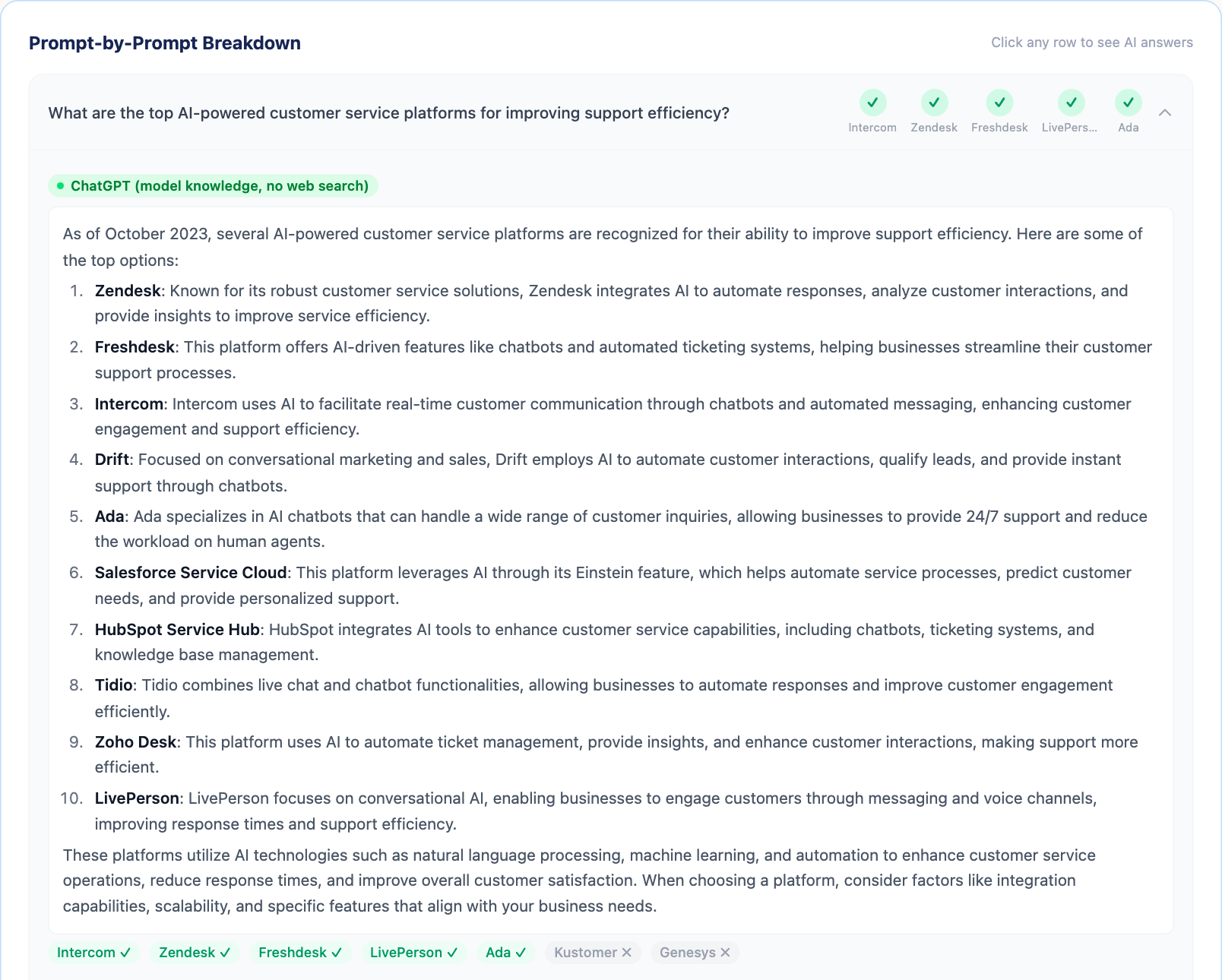
The answers, word for word
Live. Where: Report, Overview and Prompts.
Each question opens to the text ChatGPT and Gemini returned, with the brands they named marked. You read what was said, not a summary of it.
Competitors and missed questions
Live. Where: Report, Competitors.
Peach works out who you compete with from what your site sells. It classifies the offering, asks both a model and a live web search which vendors a buyer would shortlist, and drops any whose domain is dead. Up to eight competitors get the same rate you do. A missed question is one that was answered and did not name you. A report lists up to three, each with the competitors that were named instead. You can edit the competitor list, and Brand Hub keeps your version.
Your own questions
Live. Where: Report, Prompts.
Add questions of your own and run them against the same engines. Peach asks before it runs them. Custom questions and brand keywords are kept in your browser, not in your account.
Query Fan-Out
Live. Where: Report, Query Fan-Out.
Expands each question into about ten sub-queries a model might work through on the way to an answer, grouped as phrasing, vendor checks and roundups. Coverage is read from the answers already collected. It is an estimate and is labelled as one. Peach does not see inside an engine.
Market
Live. Where: Report header, Brand Hub.
Peach reads your site for evidence that you sell in one country: a country domain, local currency, a locale. Without clear evidence it measures you as global. The market steers the questions and the competitor search. You can set it yourself under "Where you compete" in Brand Hub.
Growth Actions
Live. Where: Report, Growth Actions.
Content actions written from your missed questions and from the answers that named someone else, each with blog outlines to start from.
AI crawler access
Live. Where: Report, Site Audit.
Reads your robots.txt for GPTBot, Google-Extended, ClaudeBot, anthropic-ai and PerplexityBot, and shows the text a crawler receives from your homepage. A crawler being allowed is a precondition for being named. It is not a result.
How it works
- Enter your website. Peach reads the homepage and robots.txt, and works out what you sell and where.
- Peach writes the questions. Eight questions a buyer would ask about your category. None contains your brand name.
- The engines answer. Each question goes to ChatGPT and Gemini once. A check usually takes about a minute and stops at 90 seconds.
- You read the report. Answers, rates, competitors, missed questions and actions, saved to your account.
What this doesn't do
- It does not show what a person sees in the ChatGPT or Gemini apps. Those search the web and vary by user, location and phrasing.
- It does not read Google's AI Overview.
- It does not check Perplexity, Claude, Copilot or Grok.
- It does not re-run by itself. A check runs when you start one.
- It does not score sentiment. It reports whether you were named and shows you the text.
- It does not measure visits to your site from AI engines.
- It does not offer a choice of language.
Coming soon
- Scheduled re-checks (coming soon): Not built.
- Alerts when a rate moves (coming soon): Not built.
- Perplexity (coming soon): Not built.
- Google Search evidence (coming soon): Built, not switched on. Peach can run each question as a Google search and show where your site ranks. It reads the answer box and top results, not AI Overview. Checks started in the app do not run it today.
Questions
Is the score my ranking in ChatGPT?
No. It is the share of sampled answers that named you. Peach samples one answer per question through each engine's API, without web search. The ChatGPT app searches the web and personalises, so a person can see a different answer.
Why did my score change between two checks?
A model does not give the same answer twice, and each check samples one answer per question. With eight questions and two engines, one answer is about six points. Read a move of that size as noise unless it repeats.
Which engines does Peach check?
ChatGPT and Gemini. Not Perplexity, Claude, Copilot, Grok or Google's AI Overview.
How does Peach choose my competitors?
From what your site sells, not from a fixed list. It asks which vendors a buyer of that product would shortlist, using both a model and a live web search, then drops any whose domain no longer resolves. If the list is wrong, edit it. Brand Hub keeps your version for later checks.
Do I need an account?
Yes. The first check is free, and Peach asks you to create an account before it runs. A free account covers one website and up to three checks. No card is asked for.
What is a missed question?
A question that at least one engine answered and where no sampled answer named you. The report shows which competitors were named instead, if any. A question no engine answered is not counted as missed.
Read more
See which AI answers name you
Run a free check. Free. Peach asks you to create an account before the check runs. No card.